ChatGPT 5 Features: What You Need to Know

Artificial intelligence is rapidly becoming a foundational part of how businesses and individuals operate every day. Among the growing landscape of AI tools, ChatGPT has emerged as one of the most widely recognized and adopted across industries and roles.
According to recent data:
- More than half of American adults (61%) have used AI in the past six months, and about a quarter of Americans report using ChatGPT (28%) specifically.
- According to a Rethink Priorities survey of U.S. adults, 47% of adults have used an LLM, with 40% of adults reporting using ChatGPT specifically.
- In tech, adoption is even higher: 91% of professionals report using an LLM for work, with 82% reporting ChatGPT usage.
As AI becomes more deeply integrated into daily workflows — from marketing and design to coding and customer support — those numbers are only expected to rise. Here’s what you need to know about the latest ChatGPT 5 features and what they mean for your work.
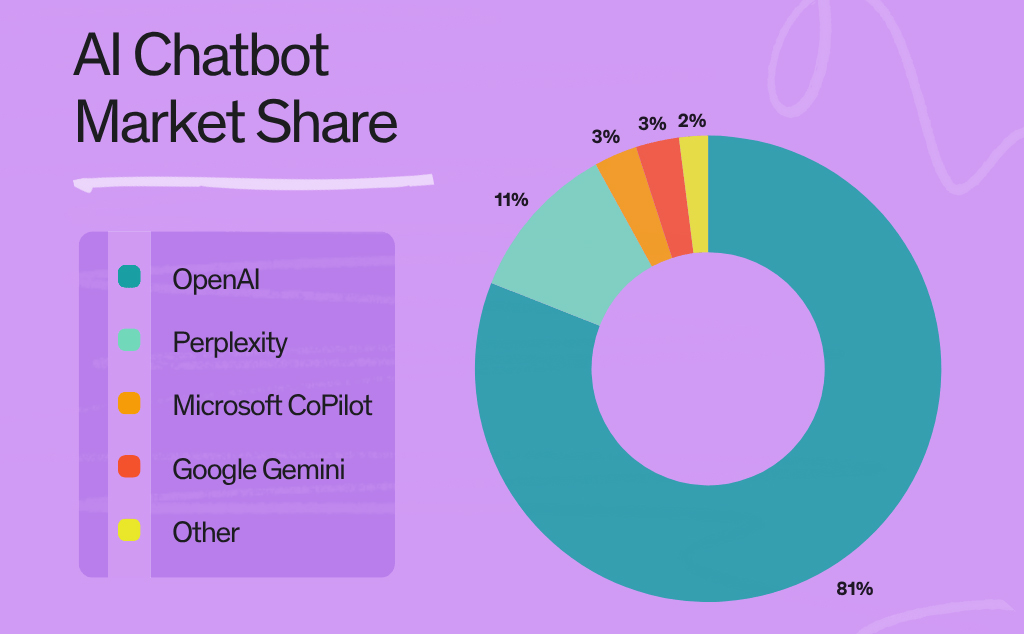
The Dawn of a New AI Era
ChatGPT 5 marks the most significant leap forward in the evolution of AI models to date. It has advanced with even faster response times and extended reasoning capabilities, making it more capable than ever for managing complex tasks.
What’s New in ChatGPT 5?
- More advanced reasoning and problem-solving
- Improved coding and debugging
- Multimodal capabilities
With these upgrades, ChatGPT 5 functions less like a chatbot and more like a versatile assistant — built to boost productivity, support creativity, and tackle technical challenges across a wide range of professional workflows.
A Unified System
Earlier versions of ChatGPT relied on a single model to manage all tasks. ChatGPT 5 is built on a unified system behind the scenes, it seamlessly integrates multiple models, tools, data sources, memory, and user preferences — all working together to deliver smarter, more personalized responses. .
The system uses a combination of the following:
- Multiple AI models to handle different tasks
- Built-in tools
- Real-time data access
- Long-term memory
- Personalized user controls
A Shifting Landscape
Since its first introduction, ChatGPT has been instrumental in making AI accessible to the public. With ChatGPT 5 there is a clear response to the shift in the way people are interacting with generative AI.
- More accessible and useful across a wide range of roles.
- New standards for accuracy, reasoning, and real-world problem solving.
- Accelerating how businesses and individuals are adopting AI into daily workflows.
The latest release makes ChatGPT more than just a chatbot; it is becoming an AI work platform that supports productivity, decision-making, and creativity at a whole new level.
Key Features of ChatGPT 5
ChatGPT 5 offers new key features designed to make it more reliable and adaptable, while improving how the model understands, processes, and solves complex tasks.
Unified Architecture & Smart Routing:
The system automatically routes your request to the right model for the task, all under a single interface.
- A fast model for simple queries.
- A deeper reasoning model for complex tasks.
Deeper Reasoning & Problem-Solving:
A more advanced reasoning capability referred to as “Thinking Mode” allows the model to:
- Break down complex tasks into manageable steps.
- Perform multi-step analysis for technical problem solving, like coding, math, and data analysis.
- Provide more coherent and logical outputs, especially in long or complex queries.
Enhanced Coding & UI Generation:
Improved capabilities for technical tasks make ChatGPT 5 an asset for developers and engineers. This includes:
- Smarter debugging and code refactoring.
- The ability to generate complete front-end websites and apps from a single prompt.
Multimodal & Real-Time Functionality:
ChatGPT 5 can process and respond to text, images, and even video. It also has “agentic” behavior, which allows it to:
- Interpret visual inputs like screenshots or graphs.
- Assist with visual content creation.
- Access external tools or functions to complete more complex tasks in real time.
Dramatically Reduced Hallucinations:
In previous versions, if there were inaccuracies or gaps in information, which could produce incorrect responses (also known as hallucinations). In response to user requests, ChatGPT 5 offers significant improvements in:
- Factual accuracy
- Instruction-following
- Reliability for professional tasks
Customization & Personality:
This feature allows users to select personalities and speaking styles for a more tailored experience. Ideal for roles with client communications, personalized content generation, and targeted messaging.
- Choose from predefined “personas” for different types of conversations (e.g., formal, casual, technical).
- Customize tone and communication style to fit your preferences or audience.
- Create a more user-friendly interaction experience.
How to Get Started with ChatGPT 5
It can be easy to get overwhelmed by the constant stream of information about AI. However, getting started with ChatGPT 5 can be very simple!.
Access Tiers
ChatGPT is available to the public, but different features are available for free, Plus, Pro, and business users.
- Free or Plus: For the casual user, quick tasks, or testing out features.
- Pro, Business, and Enterprise: Offers more advanced features like smart routing, deeper reasoning, and access to specialized tools. Ideal for more complex projects like coding, large documents, and data analysis.
Prompting for Success
ChatGPT 5 can handle complex tasks, but it often needs clear guidance with a new level of prompting. How you ask is just as important as what you ask. This encourages a deeper reasoning mode that makes ChatGPT more responsive.
Prompting tips:
- Be clear and specific.
- Use multi-step instructions like break down, compare, or summarize.
- Specify the desired format of how you want the response (e.g., bullet points, summary, table).
Practice prompts for real-world tasks:
- Drafting an email
- Fixing broken code
- Preparing for a presentation
Core Use Cases
No matter your job title, department, or industry, ChatGPT 5 can support your work and increase productivity.
Marketers and Creatives: Brainstorm content, adapt tone and voice for various audiences, and generate outlines or creative drafts.
Developers and Engineers: Write and debug code, automate test creation, code documentation.
Analysts and Data Professionals: Summarize reports and large data sets, compare trends and identify patterns, and build decision frameworks based on real-time data.
Students: Prepare for tests with practice questions, summarize readings and lecture notes, and break down complex information.
ChatGPT 5 and the Future of Work
When used properly, ChatGPT 5 can provide numerous benefits in business operations, workflows, and strategies. While IT departments took the early lead to integrate AI in their daily operations, professionals across all divisions are adapting to changing AI-enhanced workflows and roles.
The ease of access and increased reliability have made ChatGPT a core tool for businesses across the globe. Its ability to assist with complex problem-solving, automate repetitive tasks, and enhance creative output is transforming how people work. For businesses, this marks a significant shift. AI is no longer experimental or optional; it’s becoming essential in the workplace.
Prompt Engineering
Professionals need to understand how to communicate with AI effectively and efficiently. Prompt engineering is the practice of crafting precise, structured inputs to guide AI models to produce consistent and desired results.
Customizing prompts can help guide ChatGPT:
- Understand the context of the task.
- Use proper terminology to fit industry needs.
- Follow guidelines or tone appropriate for the audience or situation.
Human-in-the-Loop Oversight
The latest AI models have enhanced capabilities but can still make errors. Which means, they continue to require human oversight and information verification.
- Avoid exclusively trusting AI-generated outputs and assume they are correct.
- Recognition of ethical and security measures is essential.
- Follow your organization’s compliance standards.
Learn How to Master ChatGPT 5 with Git
Mastering tools like ChatGPT 5 will give you a competitive edge in your field. Git has practical career-focused training for marketing professionals and business users to keep up with the latest enhancements in the ever-evolving AI technology. To enhance your practical skills, you can enroll in Learning ChatGPT.
From Prompting to Practical Application
As AI tools like ChatGPT become more powerful, it’s imperative to stay ahead and learn how to utilize their newest features effectively. These advancements can enhance operations, workflows, and strategies across all industries.
Career-Focused Skills for the New AI Era
Take your skills to the next level and learn how to interact with ChatGPT’s new unified architecture and “Thinking Mode” at your own pace, ensuring your skills stay current. From developers to marketers, you can explore a range of courses for your specific role and industry.
Please Log in to leave a comment.