What’s Your Personal Productivity Style?
Helps readers identify their personal productivity style and understand how cognitive preferences influence time management, learning, and work performance.

This article was published in Harvard Business Review, a credible and valuable source in the field of business.
Author: Carson Tate
When it comes to personal productivity advice, one size doesn’t fit all. In fact, your cognitive style—that is, the way you prefer to perceive and process information—can have a dramatic impact on the success or failure of time management techniques and performance enhancement strategies. This assessment is designed to help you understand your own style—how you think, learn, and communicate best—and to guide you toward productivity tips that like-minded people have found most effective.
In table 3-1, indicate how often each statement applies to you.
TABLE 3-1
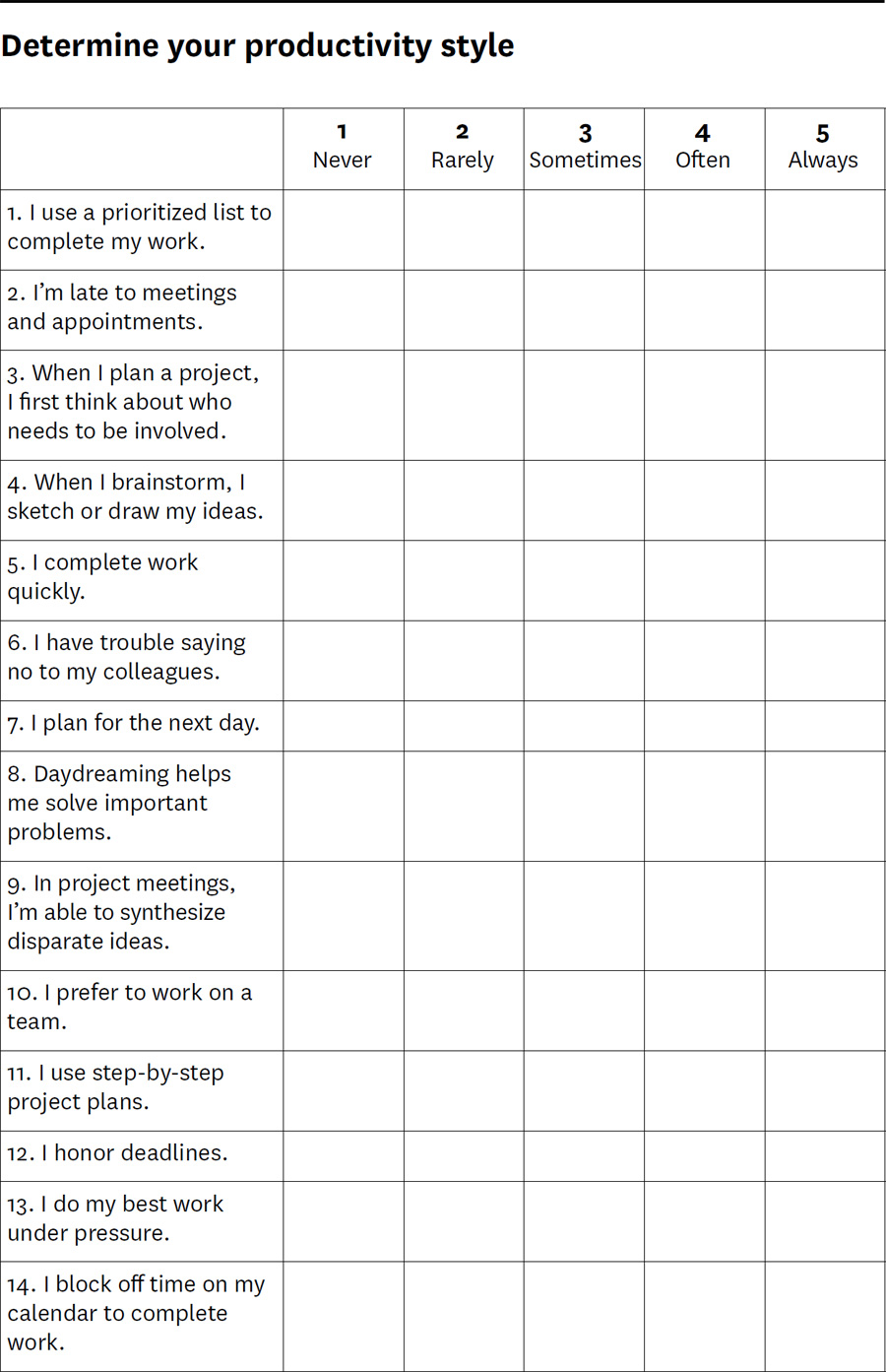
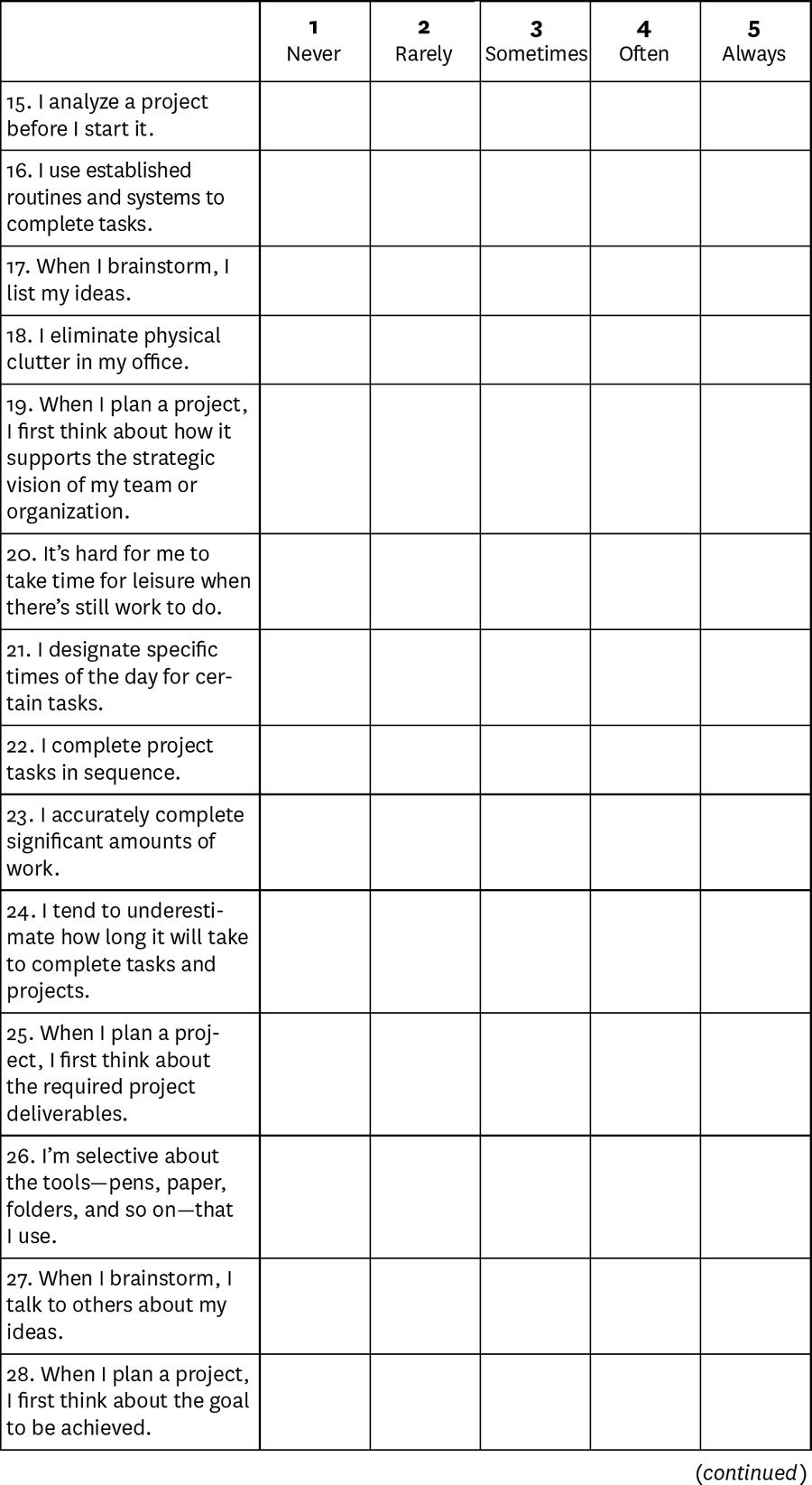
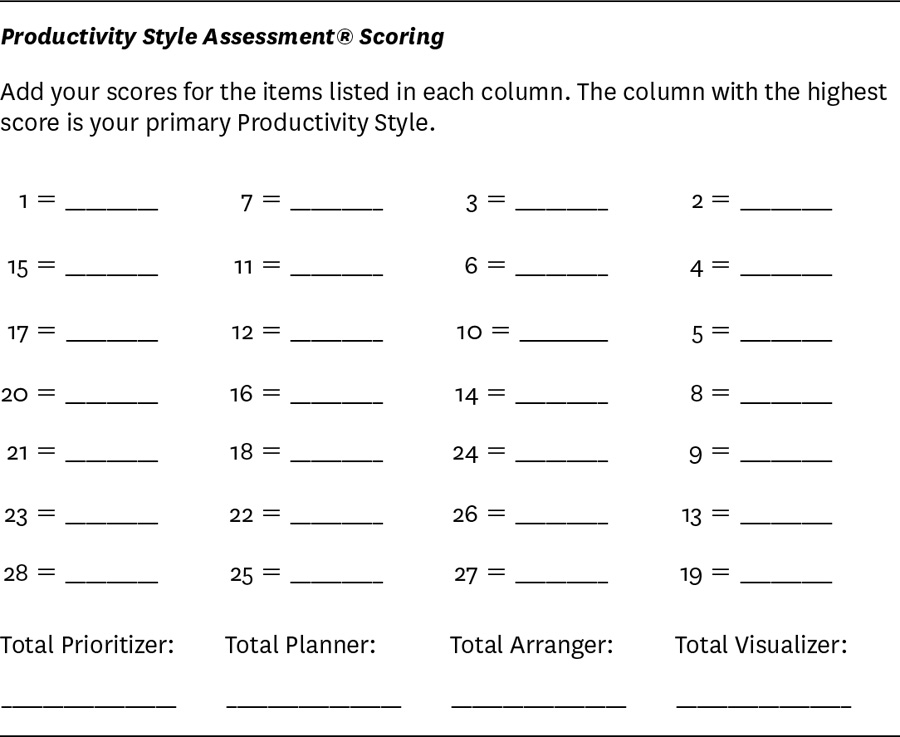
The Four Productivity Styles
Prioritizers
Prioritizers prefer logical, analytical, fact-based, critical, and realistic thinking. They use time effectively and focus on the highest-value tasks, accurately completing significant amounts of work. They analyze project goals and strive to achieve the desired outcomes.
Productivity tools that appeal to Prioritizers include:
The iPad (which they can customize to streamline their work flow)
Productivity apps that allow them to log into their devices anywhere and complete work remotely like Evernote, Noteshelf, To Do, LogMeIn Ignition
ScanBizCards, which lets them scan business cards on the run
Classic low-tech tools like legal pads and label makers
Prioritizers will especially enjoy the article “Align Your Time Management with Your Goals,” and “A Tool to Help You Reach Your Goals in Four Steps.”
Planners
Planners prefer organized, sequential, and detailed thinking. They create to-do lists, set aside time for tasks, and prepare thorough and accurate project plans. They don’t waste time on anything unproductive or unimportant. They comply with laws, policies, regulations, and quality and safety criteria, and they frequently complete work ahead of deadline.
Productivity tools that appeal to Planners include:
Digital lists and project planning apps that let them create and track their work by project, place, person, or date like Tom’s Planner and OmniFocus
Agendas, which lets them create interactive agendas and broadcast them to iPad users
ZipList, which creates both personal and shared family shopping lists, organizing items both by category and by the store that carries them
Low-tech tools like label makers, file folders, filing cabinets, drawer organizers, pen holders, and other office organizational supplies
Planners may want to start by reading the article “Accomplish More by Committing to Less,” and “How to Say No to Taking On More Work.”
Arrangers
Arrangers prefer supportive, expressive, and emotional thinking. They encourage teamwork to maximize output, and they make decisions intuitively as events unfold. They block off time to complete work but excel at partnering with others to get it done. They communicate effectively, which helps them build and lead project teams. They tend to maintain visual lists, often using color.
Productivity tools that appeal to Arrangers include:
Dictation apps like Dragon NaturallySpeaking and Dragon Dictation or the web-based program Copytalk
Collaboration tools like GoToMeeting, WebEx, SharePlus Office Mobile Client, and Join.me
Aesthetically pleasing office supplies—for example, notebooks with unlined pages and pens in a variety of ink colors
Arrangers will enjoy the article “You’ll Feel Less Rushed If You Give Time Away,” and “Staying Motivated When Everyone Else Is on Vacation.”
Visualizers
Visualizers prefer holistic, intuitive, integrative thinking. They manage and juggle multiple tasks while still seeing the big picture. They’re known for creativity and innovation and for synthesizing others’ disparate ideas into a cohesive whole. They think strategically about projects and work quickly to execute tasks. They tend to maintain visual lists, often using color.
Productivity tools that appeal to Visualizers include:
Digital whiteboard apps
SketchBook Pro, an app that lets them capture ideas while working with a complete set of sketching and painting tools
iThoughts HD, a digital mind-mapping tool
Concur, an app used to photograph and save expense receipts and create expense reports
Noteshelf, a digital notebook tool
Visually vibrant low-tech tools such as multicolored Post-it notes, colored folders, notebooks with unlined pages, pens in a variety of ink colors, large whiteboards, baskets, folders, and bags and clipboards for keeping papers visible and organized.
Visualizers may benefit from reading the article “Sprints Are the Secret to Getting More Done,” and “Gazing at Nature Makes You More Productive.”
Carson Tate is an expert on workplace productivity and the author of Work Simply: Embracing the Power of Your Personal Productivity Style.











Please Log in to leave a comment.