How to Write Articles Faster and Better with ChatGPT?

In recent years, AI tools like ChatGPT have made a significant impact on the world of content creation. Many writers and content creators assume that these tools can fully replace human writers—but that's not entirely accurate.
ChatGPT is not a replacement for human writers; it's a powerful assistant in the content production process. The quality of the output you get directly depends on the quality of your input—or what we call the "prompt." If your question or request is vague, general, or incomplete, the result will be weak and not ready for publication.
The goal of this article is to shift your mindset from "blind copy-pasting" to "smart and professional use" of ChatGPT. By the end of this guide, you'll be able to produce a publishable, SEO-optimized blog article in the shortest time possible.
Table of Contents
- The Most Important Principle: Professional Prompt Engineering
- Create the Article Structure Before Writing the Content
- Techniques and Tips for Using ChatGPT to Write Articles
- Using ChatGPT for Article SEO
- Common Mistakes Users Make with ChatGPT
- Recommended 60-Minute Process for Writing an Article
- Ready-to-Use Prompts for Writing Articles with ChatGPT
- Conclusion and Final Recommendations
The Most Important Principle: Professional Prompt Engineering
The core of success when working with ChatGPT lies in prompt engineering skills. A prompt is essentially your "instruction" or "roadmap" for the AI—it clearly defines what kind of content you expect, at what quality level, and in what format.
The clearer, more detailed, and more targeted your roadmap is, the more accurate and useful ChatGPT's output will be. Vague prompts force the tool to guess what you want, often resulting in generic, superficial, and unpublishable text. In simple terms, ChatGPT is only as "smart" as the guidance you provide in your prompt.
If you want to master this skill at a deeper and more professional level, the Prompt Engineering for ChatGPT course can give you a structured and practical understanding.
Why Do Generic Prompts Produce Weak Results?
A generic prompt like: "Write an article about digital marketing"
provides no specific information about the audience, purpose, tone, or structure. In contrast, a professional prompt looks like this:
"Write a 1500-word educational, SEO-focused article about digital marketing for beginners, using a simple and engaging tone, including an introduction, H2 and H3 headings, and a concluding section."
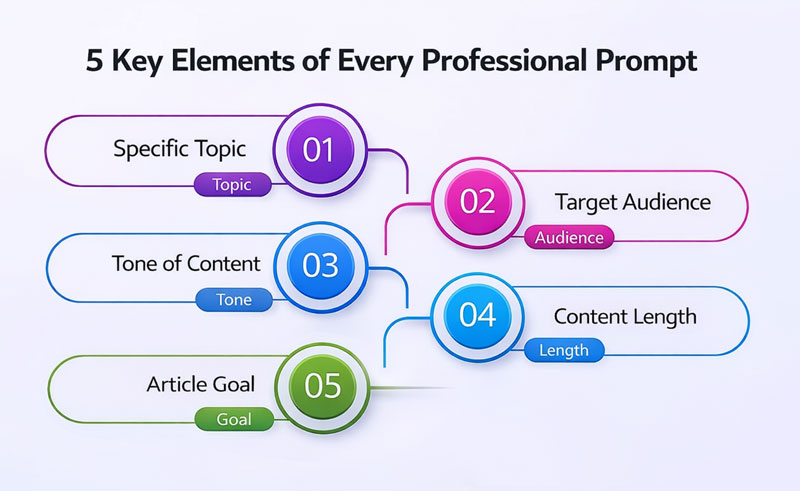
5 Key Components of a Professional Prompt
To get usable, high-quality output from ChatGPT, your prompt should include these five components:
Precise Topic: Clearly define the specific aspect of the subject the article should cover—avoid broad or vague titles. The narrower and more specific the topic, the deeper and more practical the content will be.
Example: Instead of just "digital marketing," specify: "What is digital marketing and how can it benefit small businesses?"
Target Audience: Explain exactly who the article is for—beginners, intermediate users, or experts? What are their concerns and priorities?
Example: "People who are new to digital marketing with no prior knowledge and want to learn the basics."
Tone of Voice: Define whether the text should be formal, friendly, educational, or sales-oriented. Without specifying tone, the output often feels dry or overly generic.
Example: "Simple, engaging, and educational tone—semi-formal and suitable for a blog post."
Content Length: Specifying an approximate word count prevents the article from being too short and shallow or excessively long and tedious.
Example: "A roughly 1500-word article suitable for a full blog post."
Article Goal: Clarify what the article should achieve—pure education, driving traffic, or generating interest in your services.
Example: "The goal is to teach core digital marketing concepts and increase organic blog traffic through SEO."
By following these five principles, ChatGPT's output will be several times better and much closer to your blog's actual needs.
Create the Article Structure Before Writing the Content
One of the most important techniques that many users overlook is creating the article outline before writing the main text. Many people ask ChatGPT to "write a complete article" right away, but the result is often a long, scattered, and logically inconsistent piece.
An article structure is the skeleton and overall roadmap of the content. Without a solid skeleton from the start, even the best writing can feel disorganized, making it hard for readers to follow.
The Correct Way to Work with ChatGPT
The proper approach is to divide content creation into two distinct stages.
In Stage 1, instead of requesting the full text, ask ChatGPT only to suggest the article structure, including: main title, H2 headings (main sections), and H3 subheadings.
Practical Example (Digital Marketing Article):
A Stage 1 prompt could look like this:
"For a 1500-word educational article about digital marketing for beginners, suggest only the article structure—including the main title, H2 headings, and H3 subheadings."
After receiving the structure, review it. You can rearrange headings, remove duplicates, or add important topics that were missed.
In Stage 2, once the structure is finalized, ask ChatGPT to write each section separately.
Example:
"Now write only the section titled 'What is Digital Marketing?' in about 300 words, using a simple and educational tone."
Benefits of This Approach
This method offers several key advantages:
Full Control Over Content Flow: You decide exactly where the article starts and ends.
Preventing Scattered or Repetitive Content: Each section has a clear purpose, leading to greater coherence.
Higher Final Quality: The end result closely resembles an article planned by a professional writer.
This is exactly what professional writers and content strategists do: plan the map first, then execute.
Techniques and Tips for Using ChatGPT to Write Articles
If your goal is fast content production while maintaining quality, some practical courses can dramatically speed up your learning. For example, the ChatGPT - Produce Content in Minutes with ChatGPT course focuses precisely on this skill and shows how to create publishable content with just a few simple prompts.
At this point, you have the article structure and know the path ahead. The difference between an average article and a professional one lies in applying a few simple but precise techniques—techniques that make ChatGPT produce exactly what your blog needs.
If you want to learn these techniques at an advanced level and apply them to professional content creation and copywriting, the Copywriting, Content Creation, Writing, and Production with ChatGPT o1 course is an excellent complement to this article.
Below are 5 highly practical techniques. The first two are foundational, while the next three elevate the article to a professional level.
Technique 1: Write Section by Section Instead of All at Once
One of the most common mistakes is asking ChatGPT to write the entire article in one go. The result is usually generic, scattered, and lacking depth.
Professional Approach:
Write the article section by section, using separate prompts for each.
Example (Digital Marketing Article):
"Write the section titled 'What is Digital Marketing?' in about 300 words, using a simple and educational tone, assuming the reader has no prior knowledge."
This ensures each section has greater focus, coherence, and depth.
Technique 2: Assign a Specific Role to ChatGPT
ChatGPT performs best when it knows what role to play. The role directly affects tone, examples, and explanation depth.
Example: "As a digital marketing instructor, explain the main digital marketing channels for beginners."
This technique tailors the text perfectly to your blog's audience.
Technique 3: Limit Focus in Each Section
If you include multiple topics in one prompt, the output tends to be superficial. Each section should focus on just one question or concept.
Professional Approach:
Focus each prompt on a single specific concept.
Example: "Only explain what digital marketing is—do not cover benefits, tools, or channels."
Technique 4: Request a Specific Angle
To avoid repetitive content, define the article's unique perspective. This angle differentiates your content from others on the web.
Example: "Explain digital marketing from the viewpoint of a small business with a limited budget."
Technique 5: Get a First Draft, Then Improve It Purposefully
Treat ChatGPT's initial output as a rough draft, not the final version. Real quality emerges through targeted revisions.
Example: "Rewrite this section to make it simpler, shorten long sentences, and optimize it for blog readability."
By applying these five techniques, ChatGPT transforms from a generic text generator into a precise professional assistant for blog articles—allowing you to produce high-quality, publishable content with just a few prompts.

Using ChatGPT for Article SEO
One of ChatGPT's most valuable uses is helping optimize content for SEO. It can serve as an analytical assistant for improving structure, keywords, and SEO elements—but not as the final decision-maker.
If you're serious about using AI for SEO-focused content, the AI-Powered Content Creation with ChatGPT - Mastering ChatGPT course offers a practical and advanced perspective.
ChatGPT can provide excellent initial suggestions, but they always need review, adjustment, and alignment with your site's SEO strategy.
In short, ChatGPT plays the role of "helper" in SEO, not "ultimate expert." You should verify its suggestions for logic, keyword competitiveness, search intent alignment, and compliance with search engine standards.
ChatGPT Applications in Content SEO
You can use it for:
- Extracting primary and secondary keywords
- Suggesting SEO titles
- Writing meta descriptions
- Proposing internal linking
- Creating FAQ sections
SEO-Focused Prompt Example
"For this article, write 5 common questions suitable for Google's featured snippet, with short and accurate answers."
Proper use of these features can help improve your article's search rankings.
Common Mistakes Users Make with ChatGPT
Recognizing common pitfalls puts you a step ahead of many content creators.
Most Important Mistakes
- Direct copy-pasting without any editing
- Blind trust in information without fact-checking
- Using the same generic prompt for every topic
- Not personalizing content for your blog's audience
Key Note:"The final content must always be edited by a human. Personal experience, unique tone, and audience understanding are things no AI tool can fully replace."
Recommended 60-Minute Process for Writing an Article
The purpose of this 60-minute process is not to unnecessarily prolong writing time, but to create a professional and repeatable practice for producing high-quality articles without mental strain or loss of accuracy. This model is designed for when you want a fully publishable, coherent result that meets professional standards.
Unlike ultra-fast methods, the 60-minute process gives you the speed of AI while leaving room for thinking, revising, and humanizing the content. It strikes an ideal balance between speed, quality, and precision.
If you want to reliably produce a standard blog article in a reasonable time, this process is highly practical:
10 minutes: Define topic, goal, audience, and angle
(Decide exactly what problem the article solves and from what perspective.)10 minutes: Get and refine the article structure with ChatGPT
(Receive the outline, review it, and tailor it precisely to your blog's needs.)30 minutes: Produce content section by section with controlled quality
(Write each section separately, check quality on the spot, and move forward.)10 minutes: Final editing, personalization, readability improvement, and SEO
(Humanize the text, unify the tone, and prepare the article for publication.)
By repeating this 60-minute process, your mind will adapt to a professional writing rhythm—one that's neither rushed nor obsessive. The result: sustainably faster content production with consistently high quality—exactly what a professional content creator needs.
Ready-to-Use Prompts for Writing Articles with ChatGPT
In this section, you'll find several tested, ready-to-use prompts that you can copy directly into ChatGPT. These are designed based on the teachings in this article and will help you produce professional content without much trial and error.
Prompt 1: Define Blog Article Structure
"For an educational [word count]-word article on the topic [article topic], targeted at [target audience], suggest only the article structure—including the main title, H2 headings, and H3 subheadings. The structure should be coherent, logical, and suitable for blog publication."
Prompt 2: Write a Specific Article Section
"Acting as a [desired role, e.g., instructor or consultant], write only the section titled [section title] in about [word count] words. Use a simple, engaging, and educational tone, assuming the reader has no prior expertise."
Prompt 3: Limit Content Focus
"In this section, answer only this question: [specific question]. Do not go into side topics—keep the focus solely on this concept."
Prompt 4: Rewrite and Improve Initial Text
"Rewrite this text to make it more readable, shorten long sentences, and optimize it for blog publication. Use a semi-formal and professional tone."
Prompt 5: Get SEO Help for the Article
"For this article, suggest the primary keyword and 5 secondary keywords, write an SEO title and meta description, and provide 5 FAQ questions suitable for Google's featured snippet."
Prompt 6: Write the Article Conclusion
"At the end of the article, write a short and practical conclusion that reviews the main points and encourages the reader to take action."
You can save these prompts and simply replace the bracketed parts for each new topic. With repeated use, your content production speed and quality will improve noticeably.
Conclusion and Final Recommendations
In this article, we've seen that effective use of ChatGPT for blog writing depends far more on how you use it than on the tool itself. ChatGPT is neither a full writer replacement nor a magic solution—it's a smart assistant that, when guided properly, can significantly boost speed, organization, and content quality.
The key takeaway: output quality comes directly from input quality. Precise prompt engineering, creating structure first, using targeted techniques, and following a defined process (like the 60-minute model) keep full control in your hands—not the tool's.
For a practical summary:
- ChatGPT performs best with small, specific tasks, not broad requests
- The article structure is the backbone of content and should never be skipped
- Simple but calculated techniques make the difference between ordinary and professional content
- Human editing and personalization are non-negotiable steps
Ultimately, the best results come when your experience, judgment, and audience knowledge combine with AI's processing power and speed. In that synergy, ChatGPT not only accelerates article writing but helps you create coherent, trustworthy, and publishable content.
Final Recommendation
If you're just starting, don't try to do everything perfectly at once. Use this article as a template, practice the 60-minute process a few times, and gradually refine your own prompts. Over time, writing articles with ChatGPT will become a skill rather than a challenge. On this journey, remember: ChatGPT is your tool—you remain the writer.
If you're interested in creative writing, developing a personal style, or using ChatGPT for more serious writing projects beyond blogging, the following courses can complete your path:
Please Log in to leave a comment.