What Is Nano Banana AI? Full Feature Review and Complete Tutorial
Table of Contents
- 1. Nano Banana AI: More Than a Simple Image Generation Tool
- 2. Key Features of Nano Banana Pro: Redefining the Boundaries of Creativity
- 3. Step-by-Step Guide to Using Nano Banana AI
- 4. Advanced Tips and Integration with Other Tools
- 5. Access and Transparency: Usage Models and Watermarking
- 6. Recommended Training Courses for Hands-On Learning with Nano Banana
The world of digital image creation is on the verge of a major transformation. Imagine turning a simple photo of yourself into an image of a jungle explorer or a police officer in just a few seconds. This extraordinary power is now available thanks to Nano Banana, Google’s new and groundbreaking AI model. What truly makes Nano Banana a “game changer” is not just image generation, but its iterative editing capability—allowing you to refine and perfect an image through consecutive prompts.
This article is a comprehensive guide that explains what Nano Banana is, its revolutionary features, how it is reshaping the image creation landscape, and most importantly, how you can use it step by step to bring your ideas to life.
1. Nano Banana AI: More Than a Simple Image Generation Tool
To fully understand the power of Nano Banana, we must first explore its core identity and how it differs from other AI image generation tools. This is far more than a text-to-image converter—it is an intelligent creative assistant with a deep understanding of your instructions.
1.1. Definition and Position in Google’s Ecosystem
Nano Banana is Google’s advanced AI-powered image generation and editing tool, directly integrated into Google Gemini. While it supports text-to-image creation, its real strength lies in iterative editing—allowing users to continuously refine images through follow-up prompts without starting from scratch.
1.2. Two Versions for Different Needs: Nano Banana vs. Nano Banana Pro
Google offers two versions of Nano Banana to meet different user requirements:
Nano Banana (Standard Version): Built on the Gemini 2.5 Flash model (optimized for speed and efficiency), this version is ideal for quick and fun edits, allowing everyday users to express creativity effortlessly.
Nano Banana Pro (Professional Version): The most advanced version, powered by Gemini 3 Pro—Google’s most powerful reasoning model to date. Nano Banana Pro is designed for complex compositions that demand the highest visual quality and professional results.
It is the Pro version’s capabilities that truly make Nano Banana a revolutionary creative tool.
2. Key Features of Nano Banana Pro: Redefining the Boundaries of Creativity
Understanding Nano Banana Pro’s unique features is strategically important. The following groundbreaking capabilities, powered primarily by the Pro version, represent a major leap forward in AI-driven creative control.
2.1. Unprecedented Realism and Detail
One of the most noticeable differences between the Pro version and earlier models is the level of realism and detail. Images generated by Nano Banana Pro feature sharper, more defined details, whereas older models produced softer textures. For example, in a portrait, the Pro version can accurately render natural skin imperfections such as bumps, pores, and wrinkles—significantly enhancing photorealism.
2.2. Intelligent and Precise Image Editing
Nano Banana Pro offers powerful editing tools rarely seen in similar platforms:
Object and People Removal: Easily remove unwanted people from crowded scenes. For example, background crowds at a music festival can be completely removed, leaving only the main subject.
Lighting and Atmosphere Control: Completely change the mood of an image—turning a gloomy, cloudy day into a bright, sunny scene with vibrant colors and realistic shadows.
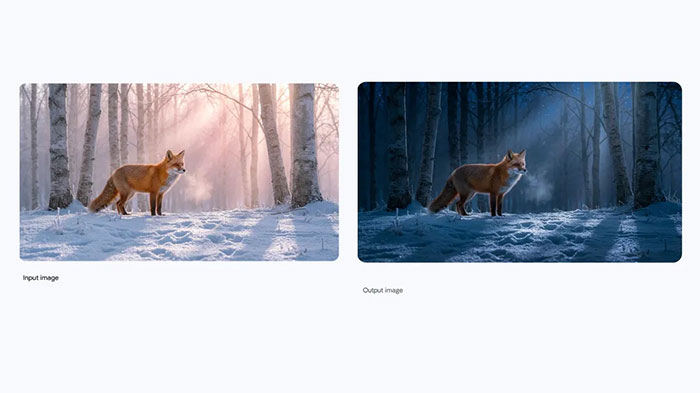
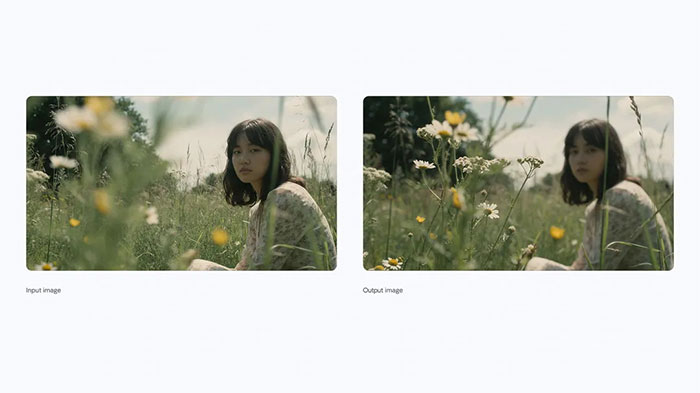
Localized Editing and Focus Control: Nano Banana Pro provides studio-level controls. You can edit specific parts of an image, adjust camera angles, change focus points (e.g., “focus on the flowers”), and even apply professional effects like bokeh (background blur).
2.3. Mastery of Text: Adding Clear, Readable Typography to Images
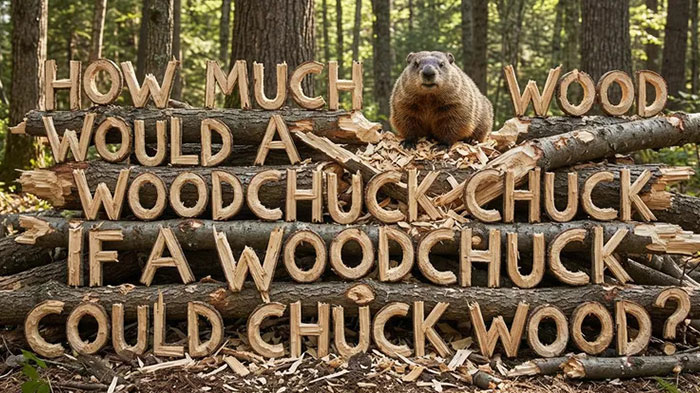
One of Nano Banana Pro’s biggest advantages is its exceptional text rendering ability. It excels at generating images with accurate, readable text—from short slogans to long paragraphs. For example, you can modify the inscription on the Statue of Liberty or precisely render a store name like “Kevin Cookie Company” on a sign. The tool supports multiple languages, fonts, and calligraphy styles.
2.4. Character and Face Consistency
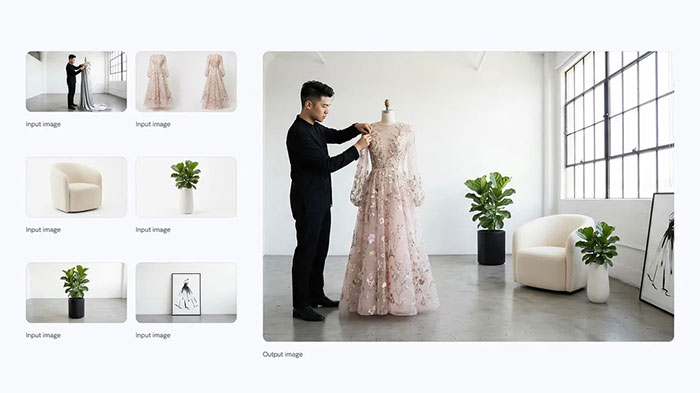
Face and character consistency is one of Nano Banana’s defining features. The tool can preserve a person’s facial identity across multiple generated and edited images. For example, you can place several individuals (up to five in the Pro version) from different reference photos into a single fashion photoshoot while maintaining accurate facial likeness.
Pro Tip: For best results when combining multiple characters, create a single reference collage image containing all faces.
2.5. Creative Blending and Image Composition
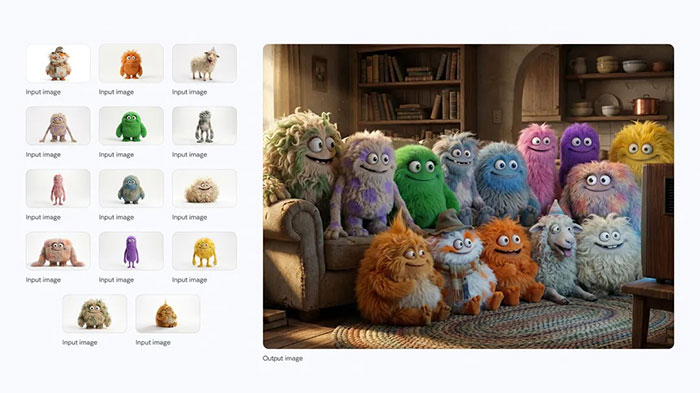
This model can seamlessly combine elements from multiple images. For instance, you can transfer a hairstyle from one image to another person, or dress someone in a jacket from a separate photo. Nano Banana Pro can merge up to 14 images into a single composition.
2.6. Product Mockups and Infographics
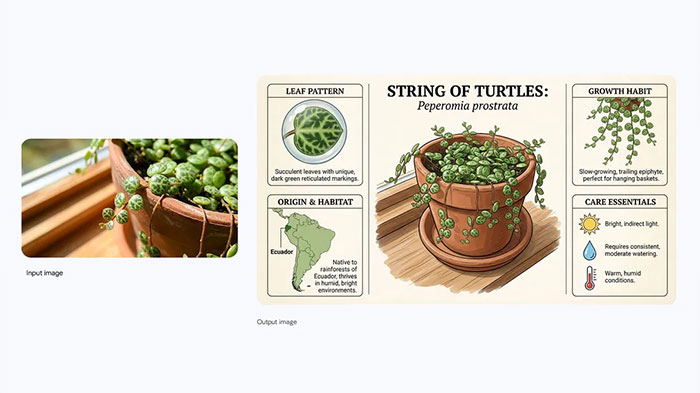
Nano Banana also has powerful professional applications. It can generate realistic product mockups—even for complex objects like souvenir figurines. Additionally, Nano Banana Pro leverages its reasoning capabilities to create content-rich infographics and diagrams for cooking instructions, educational materials, or real-time data such as weather conditions.
3. Step-by-Step Guide to Using Nano Banana AI
This section provides a practical, step-by-step guide to getting started with Nano Banana. The process is simple and accessible, requiring only a Google account. Most core features covered here are available to all users, including free users.
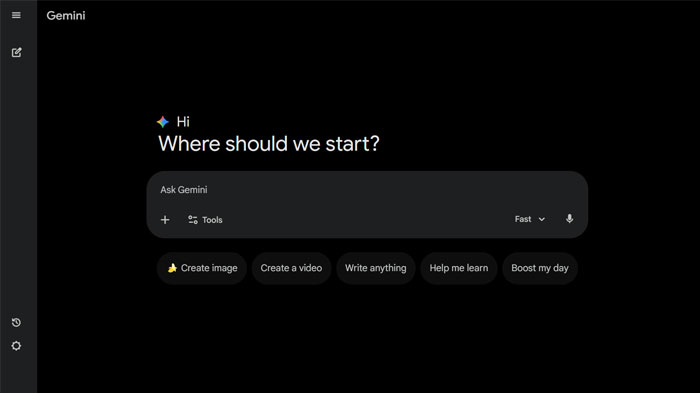
3.1. How to Access Nano Banana
Accessing Nano Banana is straightforward. You can use it via the Google Gemini website or the Google Gemini mobile app (iOS and Android). Simply sign in with your Google account.
3.2. Getting Started: From Text to Image
To create your first image, follow these steps:
Select the Tool: Enter Gemini and choose “Create Images,” indicated by the small banana icon.
Write a Prompt: Type your description in the input box. For example: (Create an image of a pastry shop on a city street).
Then click the “Submit” button.
The Power of Iterative Editing: This is where Nano Banana truly shines and is available to all users. After the initial image is generated, you can refine it with follow-up prompts. For example:
To change the store sign text, use a direct command like: (Change the pastry shop name to Kevin Cookie Company).
To adjust the mood, modify the lighting with: (Make it brighter and sunnier).
You will notice that the AI applies these changes precisely without altering the overall composition.
3.3. Working with Personal Images
You can also use your own photos. Click the “+” icon to upload an image or drag and drop it. For example, upload a portrait photo of yourself. The source video demonstrates a precise prompt for a viral style:
Turn me into a 1/7 scale collectible figurine on a desk with toy packaging beside meThis example shows how adding details like scale, location, and context can significantly improve results.
3.4. Combining Multiple Images
To blend multiple images, upload them first—for example, a photo of yourself and a photo of a jacket—then use this prompt:
Blend these two images. Put me into the jacket...You can continue refining the scene with follow-up prompts, such as placing yourself in an executive office.
3.5. Downloading and Saving Images
To save the final image, hover over it and click the download option that appears in the top-right corner to save it in full resolution.
4. Advanced Tips and Integration with Other Tools
To fully unlock Nano Banana’s potential, this section covers advanced tips and how it integrates with other Google tools.
4.1. Optimizing Output Quality
The current Nano Banana version available in Gemini generates images at approximately 1392×768 resolution. However, 2K and 4K outputs are on the way for Nano Banana Pro, offering studio-quality, print-ready results.
4.2. Beyond Static Images: Video Creation with Veo 3
One of the most exciting features is Nano Banana’s integration with Veo 3, Google’s AI video generation model. The workflow involves creating a high-quality image in Nano Banana, then using it as the starting frame in Veo 3 with a prompt like “Animate this image into a realistic video.” This feature is paid.
5. Access and Transparency: Usage Models and Watermarking
Understanding usage terms and Google’s transparency measures for AI-generated content is essential.
5.1. User Plans and Access
Free Users: Receive a limited usage quota.
Google AI Plus, Pro, and Ultra Subscribers: Enjoy higher usage limits.
Commercial Use: Nano Banana Pro is being integrated into Google products such as Google Ads and Workspace.
5.2. Watermarking and Image Identification
For transparency, Google applies an invisible digital watermark called SynthID to all AI-generated content. While not visible to the human eye, it allows tools to identify the image’s origin. You can upload an image to Gemini and ask whether it was generated by Google AI.
Additionally, a visible watermark (the Gemini sparkle icon) appears on images created by free and Pro users. This watermark is removed for Ultra subscribers and developer tools.
6. Recommended Training Courses for Hands-On Learning with Nano Banana
If you want to move from theory to practical, project-based use of Nano Banana, specialized training courses can significantly accelerate your learning. The following courses cover image editing, creative design, viral content creation, and AI-powered product marketing.
List of Nano Banana Training Courses
Learn how to create professional effects and viral images without Photoshop using Nano Banana
Learn how to build and manage faceless YouTube channels using CapCut and Nano Banana
A comprehensive course on image editing, graphic design, and professional visual content creation with AI
An in-depth exploration of Nano Banana’s artistic applications and its role in the future of AI art
Learn how to create, brand, and market digital products using AI tools
Conclusion: The Future of Creativity Is in Your Hands
Nano Banana—especially its Pro version—is a revolutionary tool that delivers unprecedented creative control, realism, and flexibility. Key strengths such as character consistency, iterative editing, and advanced text rendering set it apart from other tools. Platforms like Nano Banana are democratizing creativity, enabling designers, marketers, and content creators to bring visual ideas to life faster than ever. The future of digital art and design is here—and it’s now in your hands.
Please Log in to leave a comment.